Aviassembly Save File Location, Cloud Sync, and Compatibility
Where Windows campaign saves and aircraft blueprints are stored locally, Steam Cloud limits, autosave behavior, update compatibility notes, and starting a new game for offshore ship airports.
Steam Cloud configuration stores Windows campaign and world saves under WinAppDataLocalLow inside Aviassembly\Aviassembly\SaveGames using the *.plane file pattern, while saved aircraft blueprints live under WinAppDataLocalLow inside Aviassembly\Aviassembly\Plane Designs using the *.planedesign pattern. For how campaign saves track continents, research, and airports from start to finish, see our complete progression guide.
Windows Save Folders and File Formats
Aviassembly splits world progress and aircraft blueprints into two separate folders under WinAppDataLocalLow on Windows:
- Campaign saves (
SaveGames): Each world save uses the*.planeformat inAviassembly\Aviassembly\SaveGamesto track unlocked continents such as Spawn, Snow, Desert, and Seaport. - Aircraft blueprints (
Plane Designs): Saved planes and helicopters use the*.planedesignformat inAviassembly\Aviassembly\Plane Designs(recursive), preserving components like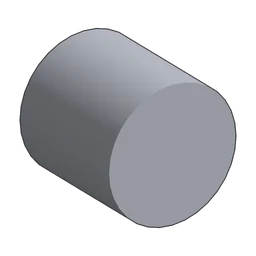 Body,
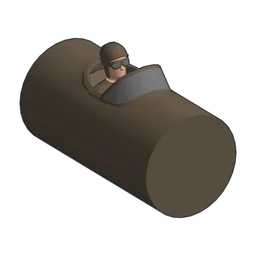 Biplane Cockpit,
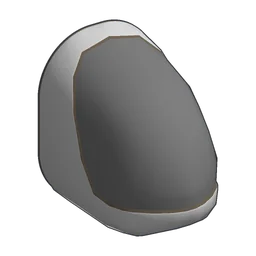 Small Helicopter Cockpit, and
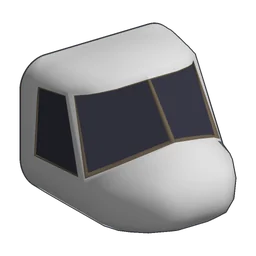 Helicopter Cockpit.
You can manage local blueprints alongside community downloads in our workshop blueprints guide.
| Part | Cargo | Weight | Price | Research |
|---|---|---|---|---|
| Body | 10 | 1 | 50 | Start |
| Biplane Cockpit | 20 | 1.5 | 150 | Start |
| Small Helicopter Cockpit | 15 | 1 | 250 | 10 RP |
| Helicopter Cockpit | 35 | 1 | 350 | 10 RP |
Steam Cloud Sync and Storage Limits
Update 10 added Steam Cloud support so save files automatically synchronize across multiple devices, which is useful when switching between a desktop and a handheld as covered in our platforms guide.
Steam’s cloud storage configuration caps synchronization at 1,000 files and 500,000,000 bytes across the SaveGames and Plane Designs directories.
Autosave Toggle and Manual Saving Rules
Demo update 5 introduced an Autosave toggle inside the settings menu alongside manual Save, Save as, and Load options. That same update also resolved a save corruption bug when saving without a plane built.
Keep one restriction in mind while flying: the game will display a warning that it cannot save while moving, so land and come to a stop before creating a manual save.
Save Compatibility Notes Across Patches
Major campaign updates and early access patches introduced several save-compatibility behaviors worth knowing if you return to an older campaign file:
- Reworked demo quests: Demo Update 3 overhauled mission structure and warned that older saves were not fully backwards compatible; while old files load, quest inconsistencies can appear.
- Relaxed mode default fix: A June patch fixed older save files accidentally defaulting to Relaxed Mode.
- Base spawn and cargo fixes: Follow-up patches resolved a wrong base airport spawn issue, fixed cargo not saving properly, and fixed parts shifting when attached to a rotator.
- Multi-version campaign tooling: Update 3 rebuilt the campaign editor to maintain multiple campaign versions for backward compatibility with older saves.
Starting a New Game for Offshore Ship Airports
Update 5 added 4 boat airports designed for rotorcraft: OilTanker, WaveRider, IronSail, and DawnBreaker. Those offshore airports in the airports database only appear when starting a New game rather than inside pre-existing campaign saves.
- 1.
Repairs
Deliver Relaxed Normal Hard Titanium×1
215 190 160 Lead×2
530 460 395 Research points:Normal: 10Hard: 3
- 1.
Repairs
Deliver Relaxed Normal Hard Copper×1
310 270 230 Steel×1
515 450 380 Research points:Normal: 10Hard: 3
- 1.
Repairs
Deliver Relaxed Normal Hard Ore×2
240 210 180 Ice×5
545 475 405 Research points:Normal: 10Hard: 3
- 1.
Repairs
Deliver Relaxed Normal Hard Lumber×2
245 215 180 Tools×4
245 215 180 Research points:Normal: 5Hard: 2
If you start fresh to tackle those offshore deliveries, check our helicopters, VTOL, and seaplanes guide for vertical takeoff builds suited to small ship decks.